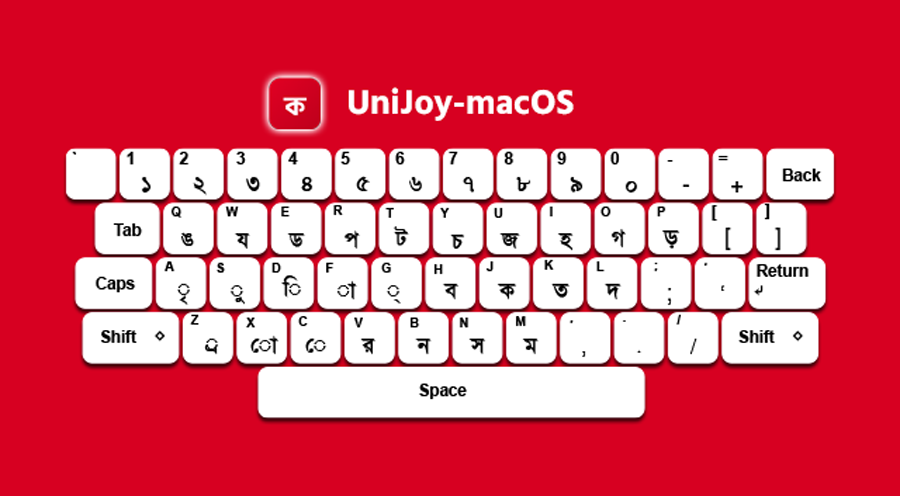
বাংলা টাইপিং এখন macOS-এ আরও সহজ, দ্রুত এবং ঝামেলামুক্ত করার জন্য তৈরি করা হয়েছে UniJoy macOS।
এটি একটি lightweight এবং system-integrated Bangla keyboard, যা সরাসরি macOS-এর Input Source system ব্যবহার করে কাজ করে। কোনো heavy software, background service বা internet dependency ছাড়াই এটি সম্পূর্ণ offline কাজ করে।
UniJoy macOS একটি আধুনিক বাংলা কীবোর্ড সলিউশন যা Mac ব্যবহারকারীদের জন্য smooth typing experience নিশ্চিত করে।
UniJoy macOS শুধু একটি কীবোর্ড নয়, বরং একটি complete Bangla typing solution:
UniJoy macOS directly uses the macOS system-level Input Source framework. This means:
This makes it one of the most lightweight Bangla keyboard solutions for Mac users.
Download UniJoy-Installer.pkg and open it. Follow the installation steps and complete setup.
⚠️ If macOS blocks the file:
Right Click → Open → Confirm installation.
Open UniJoy app from Applications or Launchpad and click Install.
The system will register the keyboard within 3–5 seconds without requiring restart or logout.
Go to:
System Settings → Keyboard → Input Sources → Edit → Add → Others → Select “UniJoy”
UniJoy macOS is designed to improve your Bangla typing experience by:
UniJoy macOS is built to simplify Bangla typing on Mac systems. Whether you’re a student, developer, or content creator, it offers a fast and reliable typing experience without any complexity.
